
미리보기
 {: .r}
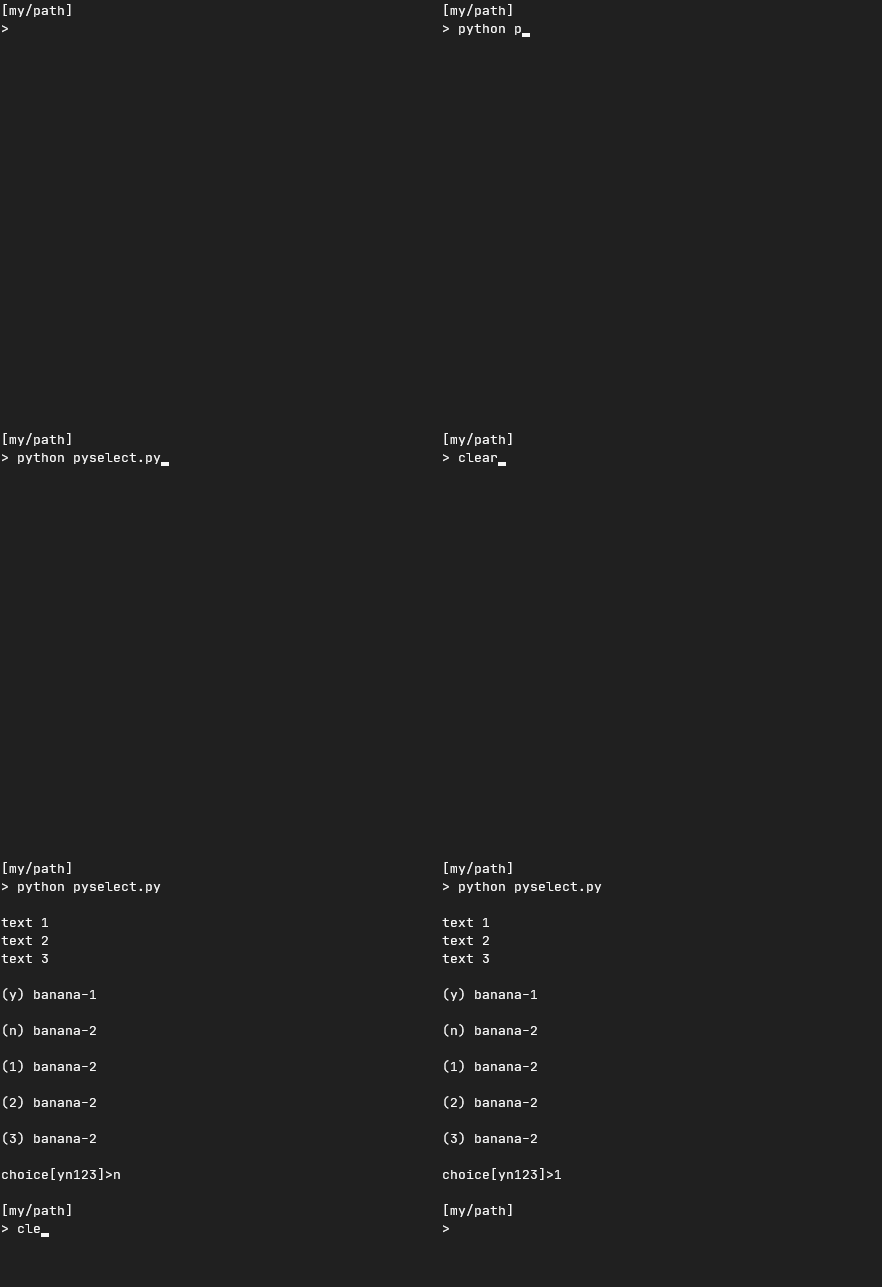
이런식으로 선택지 중 하나를 선택해서 키보드를 누르면 Enter{: .key}를 누를필요 없이 즉시 가능합니다.
만들기
코드
Gist 링크[↗] {:target="_blank"}
# pyselect.py
import msvcrt


def select(text, option):
    string = ''
    for x in text:
        string += f'{x}\n'

    option_text = ''
    choice = ''
    for x in range(0, len(option)-1):
        option_text += f'\n({option[x][0]}) {option[x][1]}\n'
        choice += f'{option[x][0]}'

    input_text = f'\nchoice[{choice}]>'

    print('\n'+string, option_text, input_text, end='')

    while True:
        try:
            key = msvcrt.getch().decode()
            if key != '0':
                if key in list(choice):
                    return key
            else:
                pass
        except:
            pass


if __name__ == "__main__":
    text = ['text 1', 'text 2', 'text 3']
    option = [['y', 'banana-1'], ['n', 'banana-2'], ['1', 'banana-2'],
              ['2', 'banana-2'], ['3', 'banana-2'], ['q', 'banana-2']]
    print(select(text, option))

#by [ywbook.github.io]
인풋
select(text, option)
여기서 인풋은 텍스트와 옵션으로 나뉘여져있습니다.
텍스트
텍스트는 리스트 형식으로 리스트 각 요소마다 한 줄이 됩니다.
text = ['text 1', 'text 2', 'text 3']
이렇게 설정하면 나오는 텍스트는 다음과 같다
text 1
text 2
text 3
옵션
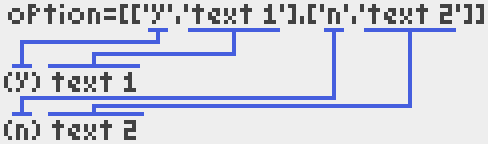
옵션은 리스트 내부의 리스트 형식이다.
option = [['y', 'text 1'], ['n', 'text 2']]
위와 같이 설정하면 다음과 같이 나온다.
(y) text 1

(n) text 2
리스트 내부의 리스트에서 첫 번째 요소는 키값(무조건 한글자!) 두 번째 요소는 표시 값이다.
 {: .r}
이런 느낌?
옵션 부분을 딕셔너리를 이용할 수 있지만 함수 쓰고 귀찮아서.. ㅎ
해석
# pyselect.py
import msvcrt
모듈 msvcrt 는 “MS VC++ 런타임의 유용한 루틴” 라고 합니다.
이 프로젝트에서는 키보드 인풋을 받기위한 모듈이라고 생각하면 됩니다.
def select(text, option):
    string = ''
    for x in text:
        string += f'{x}\n'

    option_text = ''
    choice = ''
    for x in range(0, len(option)-1):
        option_text += f'\n({option[x][0]}) {option[x][1]}\n'
        choice += f'{option[x][0]}'

    input_text = f'\nchoice[{choice}]>'

    print('\n'+string, option_text, input_text, end='')
이 부분은 텍스트와 옵션을 텍스트 형태로 변환시켜준후 프린트하는 부분입니다.
while True:
    try:
    key = msvcrt.getch().decode()
        if key != '0':
            if key in list(choice):
                return key
        else:
            pass
    except:
        pass
이 부분은 키보드 인풋을 받는 부분이다.
msvcrt 의 getch()함수를 통해서 인풋을 받는다.
decode()함수를 이용해서 키보드 인풋을 이용해 텍스트로 변환한다.
만약 변환한 글자가 option의 키보드 값중에 있을경우 그 값을 반환한다.
if __name__ == "__main__":
    text = ['text 1', 'text 2', 'text 3']
    option = [['y', 'banana-1'], ['n', 'banana-2'], ['1', 'banana-2'],
              ['2', 'banana-2'], ['3', 'banana-2'], ['q', 'banana-2']]
    print(select(text, option))
이 부분은 이 파일을 모듈로 사용하지 않을 경우에 실행하게 만든 부분. 실행경우 미리보기 에 나왔던 코드가 나온다.
모듈로 사용하기
코드 맨 윗줄에 다음과 같은 코드로 임포트 하면 된다.
import pyselect
그 후 사용할 때는 다음과 같이 사용할 수 있다.
text = ['text 1', 'text 2', 'text 3']
option = [['y', 'banana-1'], ['n', 'banana-2'], ['1', 'banana-2'],
          ['2', 'banana-2'], ['3', 'banana-2'], ['q', 'banana-2']]
ans = pyselect.select()
마무리
이상으로 {{ page.title }} 포스팅을 마치겠습니다. 긴 글 읽어주셔서 감사합니다.